Paging
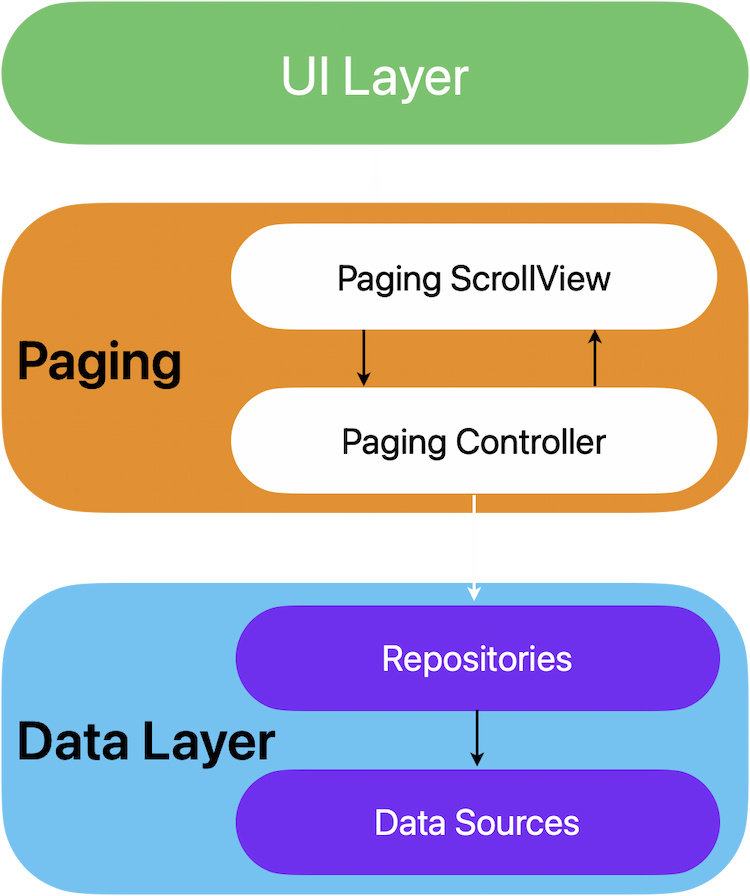
Pagination is a common technique used in apps to handle large sets of data, particularly when fetching from remote sources or when managing limited local storage. It ensures that users don’t have to wait for an entire dataset to load at once, improving both performance and user experience.With Flutter, the animated_infinite_scroll_pagination package is designed to simplify pagination with an animated scrolling experience, especially for infinite lists. It provides utilities to manage fetching pages of data incrementally and ensures smooth scrolling animations.Paging Controller
The PagingController is responsible for holding and fetching new chunks of data when the user scrolls. It is designed to isolate the pagination logic from the UI, making it reusable across different screens.Role of PagingController:
- Holds Data: It maintains a list of items that are displayed in the UI, updating this list as more data is fetched during scrolling.
- Fetches New Data: As the user scrolls down the list, the PagingController triggers an event to fetch the next chunk or “page” of data. This keeps the UI responsive by not loading the entire dataset at once.
- Manages Pagination State: It keeps track of the current page being displayed, whether there is more data to fetch, and if the fetching process is ongoing or completed.
- Handles Errors: If a data-fetching operation fails, the PagingController catches and manages errors, allowing the UI to display an error message and retry fetching data.
Advantages of Using PagingController:
- Separation of Concerns: By keeping the pagination logic in the controller, the UI remains focused on presenting the data and remains decoupled from the data-fetching logic. This makes the code more maintainable and easier to test.
- Isolated and Reusable: The PagingController can be reused across different screens or components that need pagination, such as a product list, a list of favorite items, or a list of orders. This enhances code reusability, keeping business logic centralized and separated from UI components.
- State Management: The controller manages the state of data fetching, like loading more pages, retrying failed requests, and handling refresh events. This reduces boilerplate code for managing these states in the UI.
import 'package:animated_infinite_scroll_pagination/animated_infinite_scroll_pagination.dart';

class ProductsPagingController with AnimatedInfinitePaginationController<Product> {
  final _repository = ProductsRepository();

  /// fetch data from repository and emit new state
  ///
  /// set total items count -> stop loading on last page
  ///
  /// use [emitState] to reflect new [PaginationState] to UI
  @override
  Future<void> fetchData(int page) async {
    // emit loading
    emitState(const PaginationLoadingState());

    try {
      // fetch data from server
      final data = await _repository.getProductsList(page);
      if (data?.total != null && data?.products != null) {
        // emit fetched data
        emitState(PaginationSuccessState(data!.products!));

        // tell the controller the total of items,
        // this will stop loading more data when last data-chunk is loaded.
        setTotal(data.total!);
      }
    } catch (error) {
      if (kDebugMode) print(error);
      // emit error
      emitState(const PaginationErrorState());
    }
  }
}
Lifecycle Considerations:
The PagingController is typically tied to the lifecycle of the screen or widget. It is created when the screen is initialized (e.g., inside initState()) and disposed of when the screen is removed from memory (e.g., inside dispose()).class ProductsListScreen extends StatefulWidget {
const ProductsListScreen({super.key});
@override
State<ProductsListScreen> createState() => _ProductsListScreenState();
}
class _ProductsListScreenState extends State<ProductsListScreen> {
final pagingController = ProductsPagingController();
@override
void initState() {
super.initState();
// Fetch the first chunk of data
pagingController.fetchNewChunk();
}
@override
void dispose() {
// Dispose the controller when the screen is removed to avoid memory leaks
pagingController.dispose();
super.dispose();
}
@override
Widget build(BuildContext context) {
// Build UI with the fetched data
}
}
Integration with UI:
The integration of the PagingController with the UI happens through the AnimatedInfiniteScrollView widget, which handles displaying paginated data efficiently while managing loading indicators, errors, and refresh events.This widget is designed to work seamlessly with the PagingController to provide a fluid and responsive user experience for lists with infinite scroll functionality.
Role of AnimatedInfiniteScrollView:
- Rendering Paginated Data: The AnimatedInfiniteScrollView listens to the data managed by the PagingController and dynamically displays items as they are fetched. As new data is loaded, it automatically updates the UI.
- Handling User Interaction: As the user scrolls to the bottom of the list, the scroll view detects the scroll offset and triggers the PagingController to fetch the next chunk of data. This keeps the experience seamless as more data is loaded in the background.
- Loading and Error States: While fetching data, the scroll view shows loading indicators or placeholders, ensuring that users understand that new content is being loaded. If any error occurs during the data-fetching process, an error widget can be displayed, offering retry options.
- Pull-to-Refresh: The AnimatedInfiniteScrollView supports the common pull-to-refresh gesture, which allows users to refresh the content from the beginning of the list. This triggers the PagingController to clear the current data and fetch a new set of data starting from the first page.
  @override
  Widget build(BuildContext context) {
    return Scaffold(
      body: AnimatedInfiniteScrollView<Product>(
        controller: pagingController, // Link to PagingController
        options: AnimatedInfinitePaginationOptions(
          loadingWidget: const CircularProgressIndicator.adaptive(), // Displayed when loading
          errorWidget: const Center(child: Text('An error occurred')), // Displayed on error
          itemBuilder: (BuildContext context, Product product, int index) {
            // Build the UI for each product item
            return ListTile(
              title: Text(product.name!),
              subtitle: Text(product.description!),
            );
          },
        ),
      ),
    );
  }